ApexTool may earn a commission when you sign up through links in this article.
You have the sales export. What you need is an answer: which products drove last month’s revenue, where did sales slip, and what deserves your attention next?
That is a good reason to consider Julius AI for Excel analysis. Rather than starting with a blank report or working out another spreadsheet formula, you can ask questions about your file in plain English. Julius can analyse the data, create charts and help put the findings into a report.
For a small-business owner or operations manager who regularly downloads data but struggles to turn it into something useful, that is a more compelling proposition than another AI writing tool.
Try Julius with your next sales report
Get beyond the total at the bottom
A revenue total tells you what happened overall. It does not tell you whether one strong product hid a decline elsewhere, or whether a busy month depended on a handful of large orders.
We tried that workflow with a deliberately small, synthetic CSV: 24 single-product orders split evenly between August and September 2026. The question was straightforward: why had revenue fallen when the number of orders had not?
Julius calculated the figures correctly on its first response:
- Revenue: AUD1,620 to AUD1,460, down 9.88%.
- Orders: 12 in each month.
- Average order value: AUD135 to AUD121.67.
The useful finding was in the product breakdown. Support-session revenue fell by AUD300, more than offsetting AUD140 of gains from template packs and reporting kits. Workshop revenue was unchanged. The mix of products had changed; the revenue per order within each product had not. Julius also distinguished that arithmetic from the unanswered question of why customers bought a different mix.
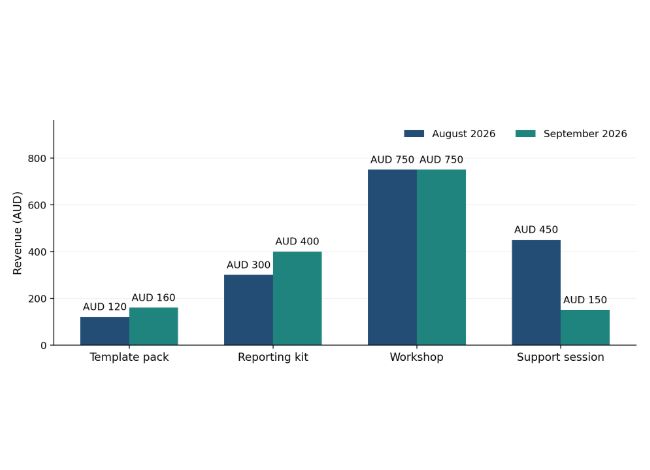
That is the appeal: move from a total to the part of the business worth investigating. We checked the figures independently against the source CSV. This small test does not establish accuracy on large, messy or complex workbooks, and the file does not establish full calendar-month coverage.
Julius supports Excel and CSV files, including workbooks with multiple tabs. Its data-analysis interface also supports follow-up questions. If a result raises another question, you can explore it in the same conversation rather than treating the first answer as the final report.
Turn the analysis into something you can share
The attractive part is not just getting an answer in a chat window. Our two-prompt example produced a one-page PDF with the key figures, a product chart and two observations. The second prompt refined the layout; it did not correct the arithmetic. Its official report page lists sales breakdowns and business-performance summaries among the reports you can create.
That gives you a practical destination for the work: a report you can review before a team meeting, rather than another export sitting in your downloads folder. Ask for the important changes, the supporting figures and the questions that still need investigating.
Julius exposes underlying analysis code, which helps make the process inspectable. Code execution is not a guarantee of correctness, though. Check the date range, missing records and treatment of refunds before relying on the conclusions. A polished chart can still answer the wrong question.
Is it worth adding another subscription?
Julius is most interesting if spreadsheet analysis is a recurring job and your current tools leave you doing the reporting work yourself. If Excel’s existing features or an AI assistant you already pay for handle that job well, you may not need another subscription.
We ran this example on the free plan. That gives you a way to explore the workflow before deciding whether it earns a place in your toolkit. As checked on 31 October 2026 (Brisbane time), Plus costs US$20 per month on monthly billing; annual billing and usage limits differ. Check the current plans before choosing one.
The sensible buying test is specific: does Julius help you produce a useful, checked report with less manual work? Judge that on your task, not a sweeping promise about AI productivity.
Start with the report you keep putting off
Choose a non-sensitive copy of a sales export you are authorised to upload, and review Julius’s privacy policy before sharing business data. Keep the original workbook untouched. If your real problem is maintaining intricate formulas, macros or a carefully formatted financial model, do not assume this analysis workflow will preserve all of it.
For understanding a straightforward export, however, Julius offers a clear reason to try it: ask the question that matters, examine the breakdown and turn the useful findings into something you can act on.