ApexTool may earn a commission when you sign up through links in this article.
The client is explaining a change to the project. You’re still typing the deadline they mentioned two minutes ago. By the time you look up, you’ve missed the reason behind the change.
That’s the problem Granola is built to help with. Its AI notepad combines the notes you type with the conversation it transcribes, then turns them into a clearer meeting record. You can concentrate on the discussion without relying entirely on your shorthand afterwards.
For consultants, account managers and small teams who spend much of their week talking to clients, it’s a product worth trying. Especially if you want AI meeting notes without an extra bot appearing in the call.
Try Granola for your next client call
Your notes, with the missing context filled in
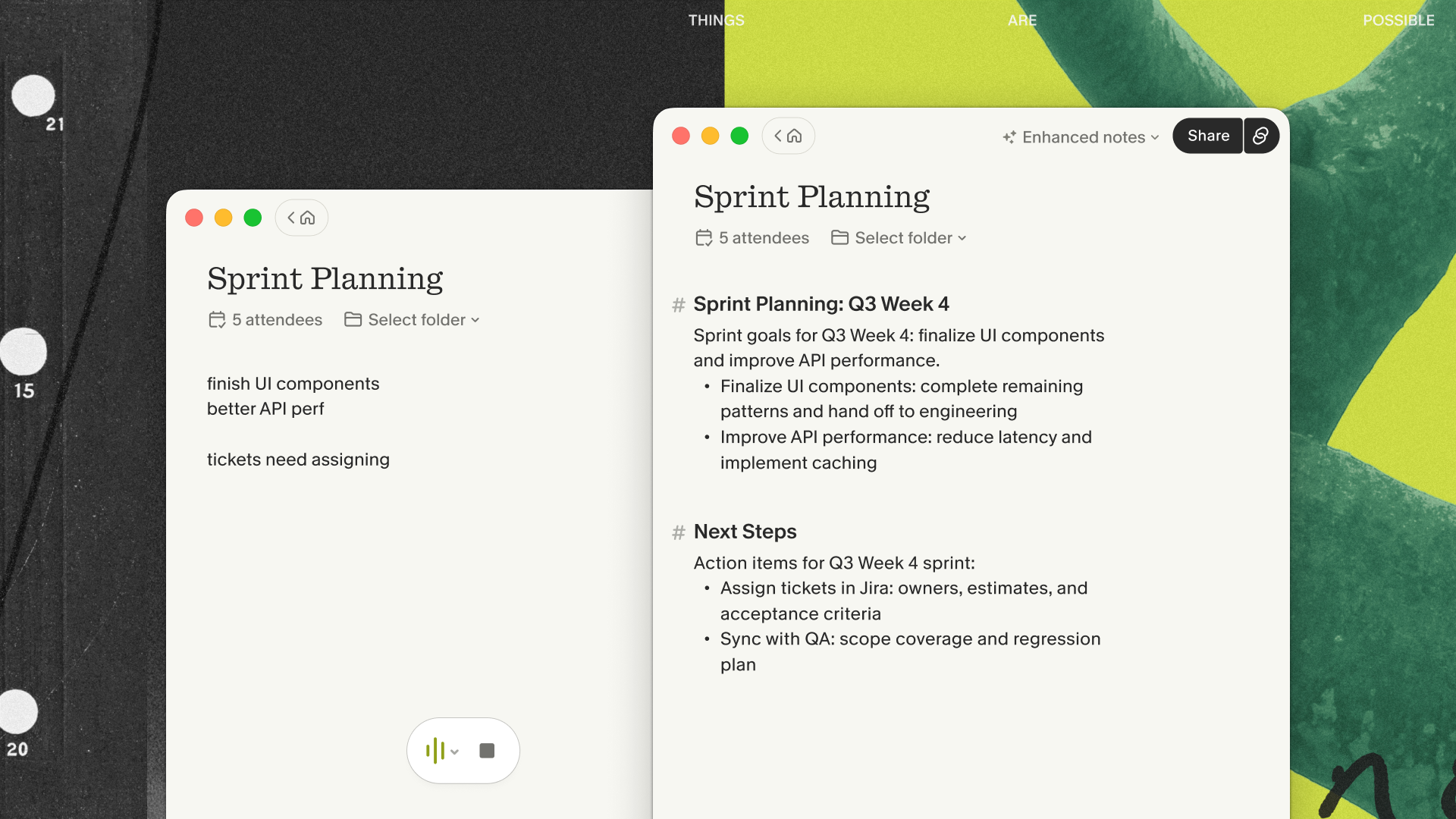
You still take notes in Granola. Write the things that matter to you: a decision, a question to revisit, a change in scope. Granola uses the meeting context to help expand those notes afterwards.
Consider a typical project call. Your shorthand might read “launch Friday / copy Tues / Mia approval”. A useful record would make clear what is launching, who is supplying the copy and what Mia needs to approve. That’s an illustrative example of the job you want the software to do, rather than a result from an ApexTool test.
Granola’s own demonstration shows rough notes becoming organised sections with decisions and next steps. That is the feature to judge when you try it: does the enhanced version preserve the details you would otherwise have to reconstruct?
No extra participant to admit
On a Mac or Windows computer, Granola transcribes microphone and meeting audio after you start it. It works with Zoom, Google Meet and Teams without joining as another attendee. There’s no separate Granola participant waiting to be admitted to the call.
You still need to be there, and you should tell everyone you’re using it and get the appropriate permission. Granola offers chat notices and a video watermark that you can enable to help make that visible.
This is a useful distinction for client work: a simpler participant list, with transparency about how the notes are being made.
Make the next conversation easier too
The value extends beyond one tidy summary. Granola lets you ask questions across your meetings, so you have another way to find the context behind a decision before the client raises it again.
Its paid Business plan adds unlimited meeting history and features including pre-meeting briefs and follow-up emails. If you regularly move from one client conversation straight into the next, those are the features to evaluate after the core notes have proved useful.
Start with the free Basic plan if you want to see whether the workflow suits you. It includes AI meeting notes and limited history, currently 30 days. Check the current plan details before upgrading.
A few things to check first
Granola uses cloud transcription and AI providers. Check your organisation’s and client’s rules before using it for confidential work. Granola also offers a model-training opt-out in settings; don’t assume that is already selected on an individual account.
It retains transcripts and notes rather than a recording you can replay. If replayable audio is essential, this workflow may not suit you. And before sharing any AI-generated notes, check names, numbers, deadlines and commitments against what was actually agreed.
Give it one real client call
Choose a suitable meeting where everyone is comfortable with transcription. Take your usual short notes, then review the enhanced version afterwards. Look for useful context, clear actions and details you can trust after checking them.
If that leaves you with a better record and less time piecing the conversation back together, you have a practical reason to keep using Granola.