Affiliate disclosure: ApexTool may earn a commission if you make a qualifying purchase through the OpusClip links in this article.
A useful webinar can keep working after the live session ends. A clear answer to a customer question, a practical example or a short product explanation can become a separate video that gives someone a reason to watch the full recording.
OpusClip is worth considering when finding and preparing those moments is the job you keep putting off. It can identify candidate clips from longer videos, add captions and reframe the picture. You still decide which clips make sense for your audience. Its ClipAnything feature also accepts prompts that describe the moments you want to find; the current plan comparison lists this prompt-led control under Pro, rather than Free or Starter.
The buying decision is straightforward: does it help you produce clips you would actually publish, with less hands-on work than your existing process? Start with one recording and answer that before committing to an annual plan. This guide is based on product documentation, not a hands-on test.
What does OpusClip cost?
Prices below are in US dollars, checked on 6 November 2026. They are advertised subscription prices, not an Australian-dollar checkout total. Check taxes, conversion costs and current terms before paying.
| Plan | Advertised price | The useful distinction |
|---|---|---|
| Free | $0; 60 credits per month | Watermarked clips, no editing, and exports stop being available after three days. Useful for an initial assessment. |
| Starter | $15 monthly; 150 credits per month | Adds editing and watermark removal. Consider it for a modest, regular publishing workload. |
| Pro | $29 monthly; 300 credits per month per pack | Adds prompt-led selection, scheduling, multiple aspect ratios and export to Premiere Pro or DaVinci Resolve. |
| Pro, annual | $174 billed annually for one pack; 3,600 credits over 12 months | Equivalent to $14.50 per month, but the commitment is annual. |
On a small screen, scroll the table sideways to read every column.
Source: OpusClip's current pricing. Paid tiers are recurring subscriptions. Its terms provide for renewal at the then-current non-promotional rate unless cancelled; cancellation does not normally provide a prorated refund for the current term. Check the checkout terms and any rights under applicable law. A free-plan limitation is not a reason to buy the largest plan; choose the smallest one that covers the job you have validated.
Count recording minutes, not the clips you hope to get
For basic clipping, OpusClip charges one credit per minute of source video processed. Its credit guide explains how to narrow the processing timeframe rather than process the whole recording.
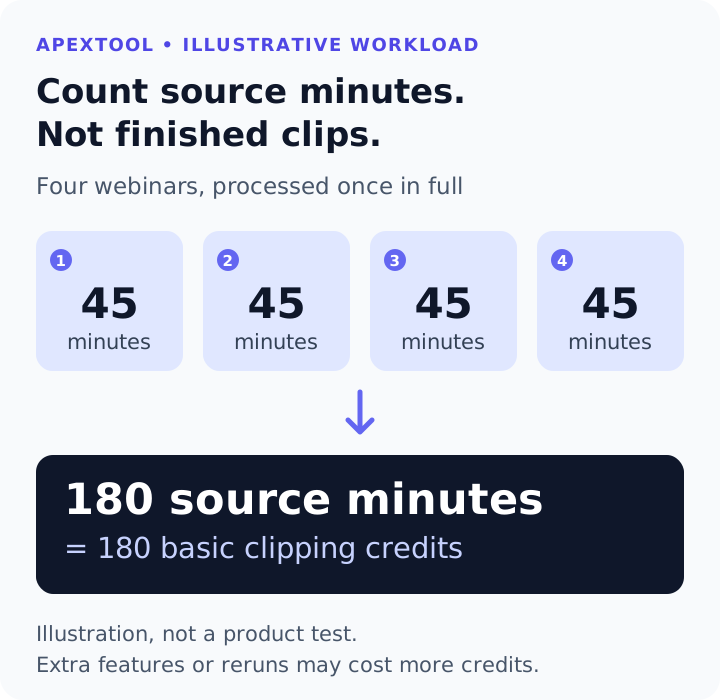
Here is an illustrative monthly workload, not an ApexTool product test:
- Four webinars, each 45 minutes long: 180 source minutes.
- Processing each complete recording once: 180 clipping credits.
- Starter's 150-credit monthly allowance would not cover that workload by itself.
- A one-pack Pro monthly allowance of 300 would leave 120 credits after those initial runs.
That remaining allowance is not a promise of a fixed number of finished clips. Reprocessing and extra features can consume more credits; check the usage shown before starting a job. For example, OpusClip's credit guide separately charges for posting to X.
If each webinar has a 30-minute teaching section you actually need, processing those four sections would use 120 basic clipping credits. Make that choice because the rest is irrelevant, rather than cutting useful content merely to squeeze into a plan.
Give it a specific editorial job
A consultant's webinar has a different purpose from a comedy highlights reel. Start with the customer problem you want a clip to answer. The prompts below assume access to Pro's prompt-led selection. On Free or Starter, use these briefs to judge the automatically selected clips instead.
Suppose your recording explains how a small business can improve its client intake process. These are three separate candidate briefs:
- Explain the mistake: find the speaker explaining why vague intake questions produce incomplete briefs.
- Show the fix: find the moment the speaker demonstrates a better question and explains what it reveals.
- Answer the objection: find the discussion of when a simple form is enough and when a more structured workflow helps.
Those are original example prompts to adapt, not tested OpusClip outputs. They give the selection process a purpose beyond “find something viral.” Use the product's clip-length and layout controls separately. OpusClip's prompt guidance says the prompt field is for choosing content, rather than changing the aspect ratio, cleaning audio or setting clip duration.
Choose material you own or have permission to reuse. For client webinars, check that permission covers public excerpts, including guest appearances, audience questions and anything visible on screen.
Before uploading client footage, also confirm permission to send it to a cloud processor and check your confidentiality obligations. OpusClip's data-training guidance says it may use individual, non-enterprise users' data to improve its models after removing personally identifiable information. Enterprise data use is governed by contract. Permission to publish an excerpt does not by itself settle permission to upload the source recording.
Judge the result by what you can publish
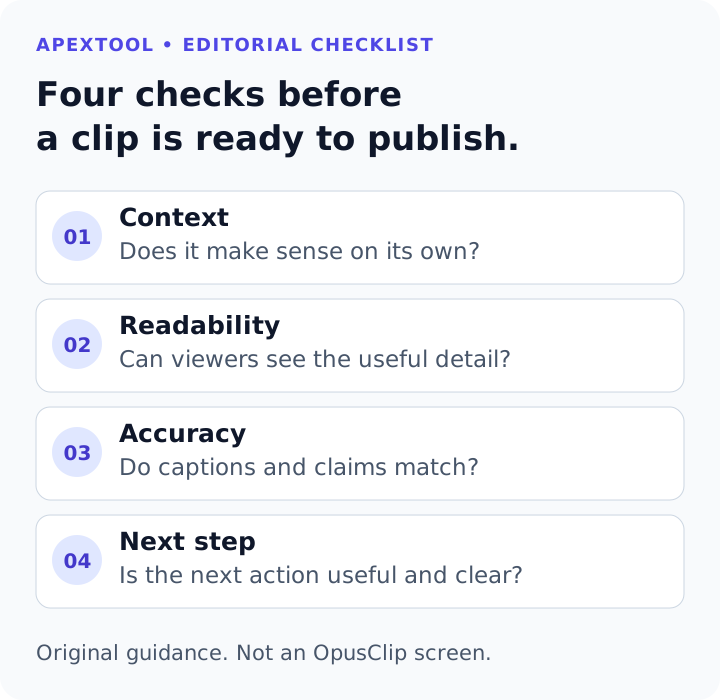
Review each candidate as a viewer who has never seen the webinar:
Does it make sense on its own? A clip that starts “and that is why it failed” may need the preceding sentence. Reject a catchy fragment if the missing context changes the speaker's meaning.
Can the viewer read the useful part? In a software demonstration, a well-framed face does not help if the relevant settings or chart are too small. Watch the clip at phone size before deciding the crop works.
Are captions and claims correct? Check names, figures and specialist terms against the original audio. Preserve qualifications that matter. An AI-selected clip is still something you are responsible for publishing accurately.
Is there a sensible next step? A useful excerpt can point viewers to the full explanation, a relevant guide or your service. Pick one next step that follows naturally from the topic. Avoid adding a sales pitch that interrupts the answer.
These checks make a stronger buying test than the number of clips generated. Ten drafts that need extensive reconstruction may be less useful than two strong candidates that need a short review.
Run a small test before subscribing
Use a representative, non-confidential recording you are allowed to upload, not just your easiest highlight. Before processing it, write down two or three moments you would look for manually. Then compare the candidates with those expectations.
Free and the introductory trial are different. OpusClip's billing guidance describes a no-card trial in countries it fully supports. If offered at signup, check its duration and included features. The trial exclusions include watermark-free exports and direct social posting or scheduling. The Free plan's editing limits are not a complete description of the trial.
Check commercial-use rights before business publication. The current terms of service restrict general service use to personal, non-commercial purposes and expressly license commercial use for Paid Services. Do not assume Free or trial output is cleared for business or client use merely because it can be downloaded.
Record four things:
- How many candidates you would publish after checking them.
- The hands-on minutes spent finding, correcting and preparing them.
- Which edits your current plan allows, and which require an upgrade.
- Whether the result fits your actual publishing channel and standards.
Keep waiting time separate from your own editing time. Download anything you need before the plan's export window closes. If Free lacks the editing you need to assess, first check whether an available trial covers it. If it does not, decide whether a short paid evaluation is worth the cost rather than committing to a year.
When paying makes sense
Starter is the first monthly paid option to consider when you have a manageable recording workload and the main missing pieces are editable, watermark-free clips.
Pro becomes more relevant when your source minutes exceed that allowance, you need prompt-led selection or different output shapes, or the scheduling and professional-editor handoff fit a workflow you already use. Verify the relevant feature and allowance on the current plan page.
Keep your existing editor if you only need an occasional excerpt, already know its timestamp, or spend most of your time on detailed creative decisions rather than finding candidate moments. Adding another subscription may not remove your bottleneck.
Our assessment uses OpusClip's current documentation and an illustrative workload. We have not run this webinar example through the product or measured editing-time savings. No tool can promise that a clip will attract viewers or customers.
For a business with useful recordings sitting unused, OpusClip offers a practical workflow to evaluate: find the candidate moments, inspect the presentation, then publish only the clips that earn their place.
ApexTool may earn a commission if you make a qualifying purchase through this link.